Whisper models have made speech-to-text a commodity, and voice AI apps are taking off. But transcription alone isn't enough. Voice AI apps need to know who said what and when. Speaker diarization solves this by detecting and labeling speakers as they talk. In a meeting with many participants, that's what lets you attribute action items and follow-ups to the right person.
Most existing diarization systems run in the cloud, which brings cost and latency problems. Streaming audio buffers to a server adds unpredictable delays, especially over cellular networks. Every minute of cloud inference also costs money in compute, bandwidth, and storage, which adds up at scale. For example, Picovoice's proprietary diarization costs up to $3 per hour of audio, so processing 1,000 hours of meetings costs up to $3,000.
Post-processed diarization can be more accurate, but it has its own problems. The biggest is cold start: post-processing systems assign generic labels like "Speaker 1" and "Speaker 2" after the fact, leaving users to guess who said what. That friction undermines the point of automation. Real-time diarization lets you assign names or roles as people start speaking and keep speaker identity consistent within and across sessions.
This post covers what we learned converting diarization models to run efficiently on Core ML, and how the Fluid Inference platform helped us do it in a fraction of the time.
Existing local options didn't fit
Some solutions already run speaker diarization on local devices like macOS, but they were CPU-bound, written in Python, or proprietary. As developers building local AI applications across Apple, Windows, and Android, we've felt how limiting these constraints are.
Pyannote is widely regarded as the benchmark for speaker diarization, but it's a poor fit for on-device, real-time apps. Its Python implementation doesn't suit native macOS development. Shipping Python as a dependency means roughly 200MB for a minimal Python install plus 350–500MB for NumPy, PyTorch, and SciPy. Native apps are usually under 100MB in total.
sherpa-onnx offered Swift support, but it doesn't run on the Apple Neural Engine (ANE), so inference falls back to the CPU. That means higher latency and power usage, both critical for real-time apps. It also lacks tight Swift and Core ML integration, so you end up managing C++ headers and bindings. These limitations pushed us toward a Core ML pipeline built for Swift and Apple hardware.
Engineering on-device diarization
Converting PyTorch models to Core ML
We considered other diarization models, but chose Pyannote's segmentation model and the WeSpeaker embedding model for their popularity, accuracy, and speed.
Speaker diarization uses two models: segmentation and speaker embedding. Running them efficiently on macOS and iOS meant going through Core ML, Apple's framework for running machine learning models on-device, which came with its own challenges.
The first issue was that the models used PyTorch operations Core ML doesn't support. Converting the embedding model, for example, threw runtime errors like these:
# Original PyTorch code using unsupported operations
features = torch.vmap(fbank_partial)(waveforms)  # vmap not supported in CoreML

# Replaced with this
features = torch.stack([fbank_partial(w) for w in waveforms.to(fft_device)]).to(device)
# Original code that caused: "RuntimeError: PyTorch convert function for op 'as_strided' not implemented"
return waveform.as_strided(sizes, strides)

# Our implementation using basic operations supported by CoreML
frames = []
for i in range(0, waveform.size(0) - window_size + 1, window_shift):
    frames.append(waveform[i:i + window_size].unsqueeze(0))
frames = torch.cat(frames, dim=0)
We also had to move the fbank computation, a common preprocessing step for audio models, outside the converted model for full compatibility. These adaptations required deep knowledge of both PyTorch internals and Core ML, which made conversion slow and error-prone.
The second issue was graph type: Core ML only supports static graphs. While tracing the embedding model, we found that Pyannote's internal logic branched on the input audio's dimensions. That produced a dynamic graph torch.jit.trace couldn't resolve into a static one. Our workaround was to handle only 1D audio inputs, which removed the problematic branches and let tracing succeed.
Building a real-time processing pipeline
We needed a system that assigns speakers on the fly, but most diarization algorithms we found were designed for post-processing. So we had to rethink the traditional pipeline to balance accuracy against the constraints of real-time, on-device inference.
Apps like Zoom or Slack Huddles seem to identify speakers in real time, but they own the audio routing. They know who's speaking from internal metadata, not by analyzing the audio. Our system works on raw, single-channel audio with no privileged access to speaker identity, which makes the problem much harder.
The original Pyannote models use a sliding window over 10-second chunks to find speaker segments in full audio files, and speaker embeddings lose accuracy on less than 3 seconds of speech. In testing, the 10-second chunks didn't hurt perceived responsiveness. Since everything runs locally, longer chunks also smooth out computation without hurting interactivity.
For every 10-second audio chunk, our pipeline works like this:
Audio flows through segmentation, speech segments, and speaker embeddings. The speaker database is checked: known speakers get their existing ID; unknown speakers require audio validation before creation. Both paths lead to transcription of each speaker segment.
- Speech Segmentation: The segmentation model finds the time intervals within the chunk where someone is speaking.
- Speaker Embedding Generation: For each speech segment, we generate a speaker embedding: a compact numerical fingerprint of the speaker's voice in that segment.
- Speaker Assignment: We compare the new embedding against our registry of known speakers and assign the segment to the closest match, keeping identities consistent as the conversation goes on.
This loop updates speaker information continuously as audio arrives, so diarization keeps pace with the conversation. It costs some accuracy, but it's good enough for real-time use.
Keeping the speaker registry clean
The system starts with an empty speaker registry. Each new embedding is checked against it, and if nothing is close enough, it's treated as a potential new speaker.
During development, coughs, background noise, and short interjections created spurious speakers. So we added a filter: a new speaker is only added to the registry after they've spoken for more than three seconds in total, combined with basic signal-to-noise checks to reject non-speech sounds. This made speaker identification much more robust.
Voices also drift over time with microphone changes, emotional state, or just long conversations. To handle this, we continuously update existing speaker embeddings with exponential smoothing. This lets the system adapt to gradual changes in a speaker's voice over a meeting without creating duplicate identities.
Accuracy: about 5 points behind Pyannote, by design
Our models averaged 22.14% DER across standard benchmarks (excluding AVA-AVD), compared to 17.0% for open-source Pyannote 3.0. We trail by about 5 points on most datasets, which we expected, since FluidAudio is built for real-time, while Pyannote was designed for batch post-processing. We do significantly better on AVA-AVD (32.6% vs. 49.1%), though that's mostly due to how we handle silent frames and non-speech audio, plus different threshold tuning on some datasets.
| Dataset | FluidAudio % | Pyannote 3.0 % | Difference (pp) |
|---|---|---|---|
| ami-hmi | 23.5 | 19.0 | 4.5 |
| ami-sdm | 26.6 | 22.2 | 4.4 |
| aishell-4 | 16.9 | 12.3 | 4.6 |
| voxconverse | 16.0 | 11.3 | 4.7 |
| ali-meetings | 27.7 | 24.3 | 3.4 |
| Average | 21.4 | 17.0 | 4.4 |
Quantization didn't pay off on Core ML
Once the models worked, we looked at reducing their latency and size. Coming from the LLM world, where quantization usually trades some accuracy for speed, we found that assumption doesn't hold for Core ML models. We automated this comparison entirely: our AI agent, working with several sub-agents, generated the chart below against the baseline from a single natural-language prompt for a human to review, saving an ML engineer days of manual work.
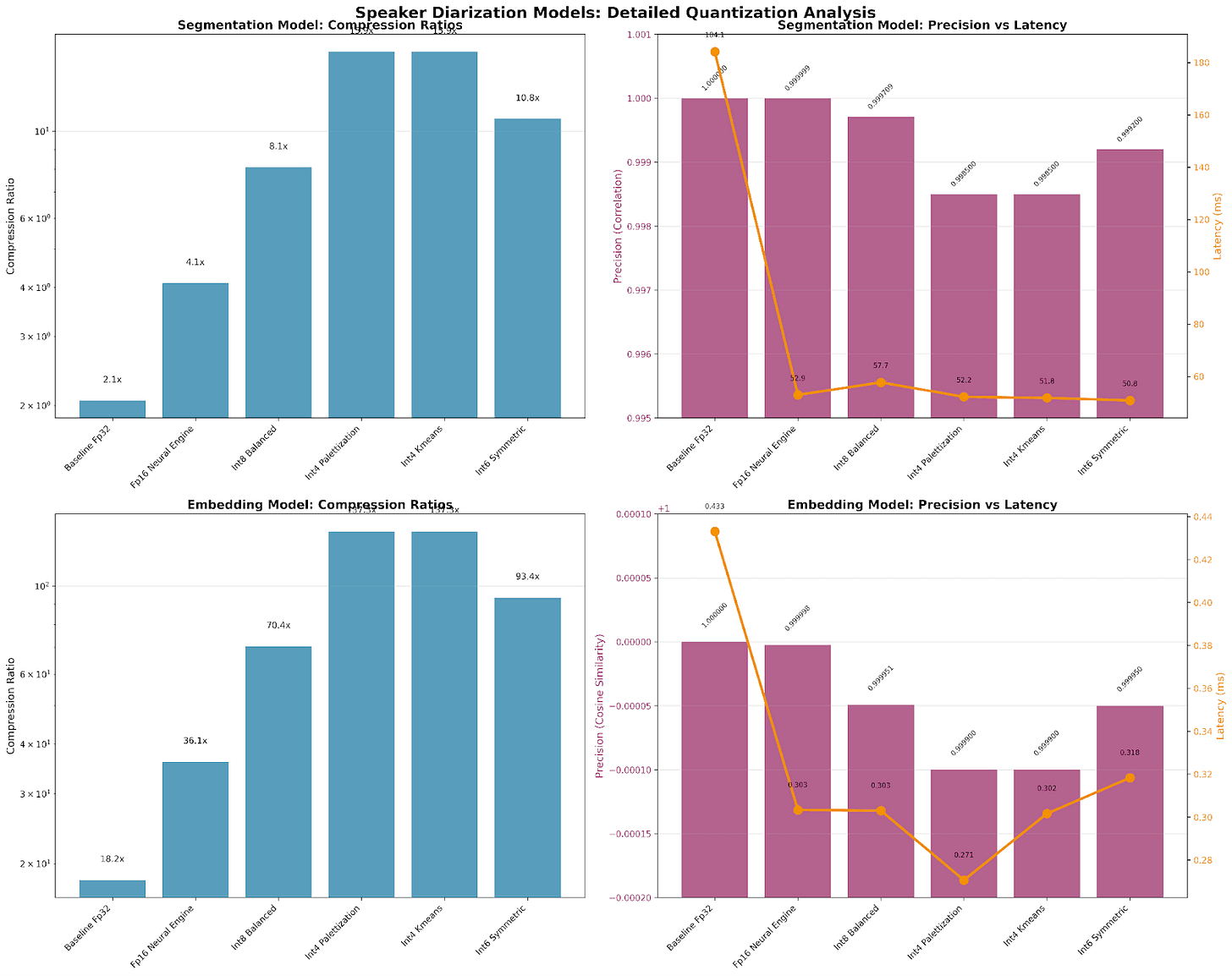
Comparison of latency, precision and compression of various quantization settings in CoreML
The recommendation was to keep the baseline FP32 models for both. Quantization compressed the models significantly, but the size and latency gains weren't worth the precision loss.
Speed: 60x real-time on an M1
FluidAudio hit 0.017 RTF (60x real-time) on a 2022 Apple M1, beating Pyannote's 0.025 RTF (40x real-time) on an enterprise-grade NVIDIA Tesla V100. That 50% speed advantage on far more accessible hardware comes from Core ML optimizations that use the ANE through native Swift. Pyannote also clusters across all embeddings in post-processing, an expensive step that adds to its runtime.
In its first month after launch, FluidAudio passed 400 GitHub stars, with thousands of model downloads on Hugging Face and multiple production AI apps rolling it out.
Update — October 26, 2026: FluidAudio has now crossed 3,200 GitHub stars and 4 million model downloads.
- GitHub stars
- 3,200+
- Model downloads
- 4 million+
From open source to production
We took on local real-time speaker diarization, despite the challenges, because we believe in the long-term success of local models. In the cloud, latency would make real-time applications unusable, especially given how compute-intensive AI is.
That investment has paid off. Building on what we learned from diarization, our Parakeet model is already available for testing in the same repository. Several production macOS and iOS apps have integrated FluidAudio for speaker diarization, including slipbox.ai, whisper.marksdo.com, and Beingpax/VoiceInk.
We've also expanded beyond Apple: our models now run on Windows NPUs, and we're working with Fortune 100 companies to deploy custom models on their AI accelerators.
If you want to add on-device speaker diarization to your app or explore working together, join our Discord or email us at [email protected].